'%20xmlns:inkscape='http://www.inkscape.org/namespaces/inkscape'%20xmlns:sodipodi='http://sodipodi.sourceforge.net/DTD/sodipodi-0.dtd'%20xmlns='http://www.w3.org/2000/svg'%20xmlns:svg='http://www.w3.org/2000/svg'%3e%3cdefs%20id='defs828'%20/%3e%3csodipodi:namedview%20id='namedview826'%20pagecolor='%23505050'%20bordercolor='%23eeeeee'%20borderopacity='1'%20inkscape:pageshadow='0'%20inkscape:pageopacity='0'%20inkscape:pagecheckerboard='0'%20showgrid='false'%20inkscape:zoom='9.0509668'%20inkscape:cx='27.23466'%20inkscape:cy='31.156893'%20inkscape:window-width='1920'%20inkscape:window-height='1009'%20inkscape:window-x='-8'%20inkscape:window-y='-8'%20inkscape:window-maximized='1'%20inkscape:current-layer='g830'%20/%3e%3cg%20inkscape:groupmode='layer'%20inkscape:label='Image'%20id='g830'%3e%3cpath%20style='fill:none;stroke:%23ffffff;stroke-width:3.05047px;stroke-linecap:butt;stroke-linejoin:miter;stroke-opacity:1'%20d='M%205.8902657,18.702345%206.0587737,7.3274925%20c%200,0%20-0.2527621,-4.4656832%203.3703259,-1.1796144%20C%2013.052203,9.433947%2022.573375,18.365313%2022.573375,18.365313%20c%200,0%201.516649,2.022198%203.623103,0.08425%202.106455,-1.937937%2012.891501,-12.5544662%2012.891501,-12.5544662%200,0%202.106455,-2.7805203%203.370326,0.4212915%20l%200.08425,12.5544697%20-16.09331,15.166473%20c%200,0%20-1.937937,2.443485%20-4.128651,0.08425%20C%2020.129886,31.76236%205.8902535,18.702342%205.8902535,18.702342%20Z'%20id='path947'%20/%3e%3cpath%20style='fill:none;stroke:%23ffffff;stroke-width:3.05047px;stroke-linecap:butt;stroke-linejoin:miter;stroke-opacity:1'%20d='m%205.8902535,18.702342%201.22e-5,22.244162%20c%200,0%20-0.4212885,4.128652%203.5388431,1.432388%20L%2019.792867,31.762363%20Z'%20id='path949'%20/%3e%3cpath%20style='fill:none;stroke:%23ffffff;stroke-width:3.05047px;stroke-linecap:butt;stroke-linejoin:miter;stroke-opacity:1'%20d='m%2042.542559,18.870862%20-0.168508,21.73861%20c%200,0%200,4.634198%20-3.538843,1.600906%20L%2028.555716,32.183654%20Z'%20id='path951'%20/%3e%3c/g%3e%3c/svg%3e)
'%20xmlns:inkscape='http://www.inkscape.org/namespaces/inkscape'%20xmlns:sodipodi='http://sodipodi.sourceforge.net/DTD/sodipodi-0.dtd'%20xmlns='http://www.w3.org/2000/svg'%20xmlns:svg='http://www.w3.org/2000/svg'%3e%3cdefs%20id='defs828'%20/%3e%3csodipodi:namedview%20id='namedview826'%20pagecolor='%23505050'%20bordercolor='%23eeeeee'%20borderopacity='1'%20inkscape:pageshadow='0'%20inkscape:pageopacity='0'%20inkscape:pagecheckerboard='0'%20showgrid='false'%20inkscape:zoom='9.0509668'%20inkscape:cx='27.23466'%20inkscape:cy='31.156893'%20inkscape:window-width='1920'%20inkscape:window-height='1009'%20inkscape:window-x='-8'%20inkscape:window-y='-8'%20inkscape:window-maximized='1'%20inkscape:current-layer='g830'%20/%3e%3cg%20inkscape:groupmode='layer'%20inkscape:label='Image'%20id='g830'%3e%3cpath%20style='fill:none;stroke:%23000000;stroke-width:3.05047px;stroke-linecap:butt;stroke-linejoin:miter;stroke-opacity:1'%20d='M%205.8902657,18.702345%206.0587737,7.3274925%20c%200,0%20-0.2527621,-4.4656832%203.3703259,-1.1796144%20C%2013.052203,9.433947%2022.573375,18.365313%2022.573375,18.365313%20c%200,0%201.516649,2.022198%203.623103,0.08425%202.106455,-1.937937%2012.891501,-12.5544662%2012.891501,-12.5544662%200,0%202.106455,-2.7805203%203.370326,0.4212915%20l%200.08425,12.5544697%20-16.09331,15.166473%20c%200,0%20-1.937937,2.443485%20-4.128651,0.08425%20C%2020.129886,31.76236%205.8902535,18.702342%205.8902535,18.702342%20Z'%20id='path947'%20/%3e%3cpath%20style='fill:none;stroke:%23000000;stroke-width:3.05047px;stroke-linecap:butt;stroke-linejoin:miter;stroke-opacity:1'%20d='m%205.8902535,18.702342%201.22e-5,22.244162%20c%200,0%20-0.4212885,4.128652%203.5388431,1.432388%20L%2019.792867,31.762363%20Z'%20id='path949'%20/%3e%3cpath%20style='fill:none;stroke:%23000000;stroke-width:3.05047px;stroke-linecap:butt;stroke-linejoin:miter;stroke-opacity:1'%20d='m%2042.542559,18.870862%20-0.168508,21.73861%20c%200,0%200,4.634198%20-3.538843,1.600906%20L%2028.555716,32.183654%20Z'%20id='path951'%20/%3e%3c/g%3e%3c/svg%3e)
MACHHUB Connect Once. Build Anything.
Machine data, dashboards and the applications you build on top, on hardware you own. Pay once. The licence never expires.
The problem
The data exists. It is just nowhere useful.
Off-the-shelf software rarely matches how a plant actually runs, so the figures end up spread across systems that do not speak to each other. What does get collected often sits on somebody else's cloud.
Software that nearly fits
Bought whole, then bent around a plant it was never written for.
Numbers in separate systems
Each one holds part of the answer. None of them holds all of it.
On somebody else's cloud
Your process data, kept under a contract you have to keep renewing.
The solution
One platform, on hardware you own.
MACHHUB holds the data, moves it between systems as it changes, decides who may see what, runs the automation, and hosts whatever your team builds on top. That is the plumbing nobody wants to write twice.
It runs on your infrastructure.
In your server room, on a gateway in the panel, or on a network with no way out to the internet at all. Nothing here needs a cloud account to keep working.
Connectivity
It already speaks to your PLCs.
Eight industrial protocols ship in the product, on every edition. Point MACHHUB at a controller, a meter or a serial device, and its values land in your namespace as tags.
Node-RED sits beside the drivers for the awkward source, for protocol conversion, and for logic you would rather draw than write. A PLC does not need a flow to reach the namespace.
Included in every edition
- OPC UA
- Modbus
- Serial
- MELSEC Mitsubishi
- FINS Omron
- MEWTOCOL Panasonic
- SIMATIC S7 Siemens
- ADS / TwinCAT Beckhoff
Drivers are not metered. Connecting more machines never changes the licence price.
How it fits together
One path in. One copy. Everyone reads the same number.
Eight industrial protocols come in on one side. On the other, the same values reach the screen on the wall, the application your team wrote and whatever the business already runs. Nothing is exported, copied or reconciled on the way.
Follow a box to the page behind it. Hover or tab to trace its path.
Capabilities
What comes in the box.
Tags, history, permissions, automation and somewhere to host what you build, already wired to each other.
One namespace
Every tag, from every machine and every system, in one tree that the whole organisation reads from.
Upstream collection
Point MACHHUB at a source and its values and events land in the namespace. No integration project in between.
Collections
Your own tables beside the tags, with relationships, queries, filtering, sorting and paging. You define the schema.
Real-time messaging
An MQTT broker in the product. Subscribe to a tag and your application hears about the change as it happens.
Historian
Tick a tag and it is recorded, at the sampling and retention you set. Query the history for analysis or for an audit.
Automation
Wire a trigger to a process and an output. Chain functions and database operations without writing a backend.
Files
Drawings, certificates and photographs sit in collections beside the records they belong to.
Permissions
Users, groups and per-feature rights, with API tokens for machines. Each domain is isolated from the others.
App Runtime
Serve your own web applications from MACHHUB itself, so an internal tool needs no second server to keep alive.
Dashboards
A screen without a project.
A supervisor who wants to see the line should not have to raise a ticket for it. The dashboard builder is in the product, and the people who need the numbers can lay out their own view.
- Drag widgets, charts and indicators into place
- The people who read the numbers build the view themselves
- Wired to live tags and to your collections
- Minutes from a tag to something on the wall
When a screen outgrows the builder, a developer takes the same data into a web application of their own on the App Runtime.
What the dashboards do$ machhub deploy ./dist
✓ Building app...
✓ Optimizing assets...
✓ Uploading to App Runtime...
✓ Configuring domain...
🚀 Deployed: https://machhub.local/apps/my-dashboard
Runtime: MACHHUB App Runtime v1
Domain: my-domain
Status: Live ✓App Runtime
Your own application, hosted here.
Build a web application in whatever Vite framework your team already knows, then serve it from MACHHUB itself. There is no second server to provision, patch or explain to IT.
Dashboards for the people who read the plant. Applications for the people who build it.
For developers
Install two things and start writing.
A typed TypeScript SDK, an IDE extension that finds the server on its own, and agent skills your assistant reads before it writes any MACHHUB code.
TypeScript SDK
@machhub-dev/sdk-ts
A first-class TypeScript SDK for collections, auth, real-time messaging, historian, remote functions, and file handling. Fully type-safe.
import { SDK } from '@machhub-dev/sdk-ts';

const sdk = new SDK();
await sdk.Initialize();

// Real-time data
await sdk.tag.subscribe('sensor/+', (data, topic) => {
  console.log(`${topic}: ${data.value}`);
});

// Collections CRUD
const items = await sdk.collection('products').getAll();
Designer Extension
VSCode · Cursor · Antigravity
An extension for VS Code, Cursor and Antigravity. It finds your MACHHUB server itself, so there is nothing to configure before you write the first line.
AI Agent Skills
Official · maintained by MACHHUB
Skills that MACHHUB developers write and maintain, for whichever coding agent you already use, plus a connector in beta.
Initialize a MACHHUB project using the Next.js + React stack
I'll scaffold a MACHHUB Next.js + React project for you.
// lib/machhub.ts
import { SDK } from '@machhub-dev/sdk-ts';
let _sdk: SDK | null = null;
export function getSDK() {
  if (!_sdk) _sdk = new SDK();
  return _sdk;
}"Open your IDE. Install the SDK. Then let your agent do the rest."
MACHHUB Gateway
The box, with the software already on it.
A fanless metal unit that mounts on DIN rail, runs off the panel's 10 to 30 V supply and arrives with MACHHUB installed. Wire it in, point it at the controllers, and it collects.
- MACHHUB is already installed on every model
- Fanless metal case, DIN rail, isolated serial and I/O
- Four models, sized to what the panel has to do
- Sold as a bundle. The hardware is not sold on its own
Two series: MCH-A at 1.5 GHz and MCH-A5 at 2.4 GHz. Full specifications on the Gateway page.
How it works
Six steps to a screen on the wall.
Start from an empty rack or add MACHHUB to the machines already on the floor. The path is the same either way.
GET STARTED
Install MACHHUB on your own hardware, or buy a MACHHUB Gateway with it already on.
CONNECT
Point it at your PLCs, meters and databases. Their values land in your namespace.
DESIGN
Lay out the namespace and the collections your plant actually uses.
BUILD
Drag a dashboard together, or build a web application in the framework you know.
DEPLOY
Host that application on MACHHUB itself. No second server to look after.
OPERATE
Watch it, automate around it, and change it as the plant changes.
Who uses it
Six people, one set of numbers.
The operator, the engineer and the manager all read the same tags. Nobody keeps a private spreadsheet to reconcile afterwards.
Organisations
The data stays on hardware you own, and so does whatever you build on it. Nothing here needs a cloud account.
Operators and supervisors
Lay out your own dashboard and read the line from it. Bringing a new source in takes a few clicks, not a project.
Developers
A typed TypeScript SDK, an IDE extension and official agent skills. Build in any Vite framework and deploy to the platform itself.
System integrators
One platform to build every client system on, with each customer isolated in their own domain.
Operations teams
Live values, the history behind them, and automation that acts on both. That covers most of what a plant asks for.
IT and OT teams
One namespace across both sides of the fence, deployed at the edge and able to run with no internet. A Gateway arrives with it installed.
In production
Built on MACHHUB, running today.
Three systems delivered on the platform, from a single machine up to a whole site. Every screen below is the live application, not a mock-up.
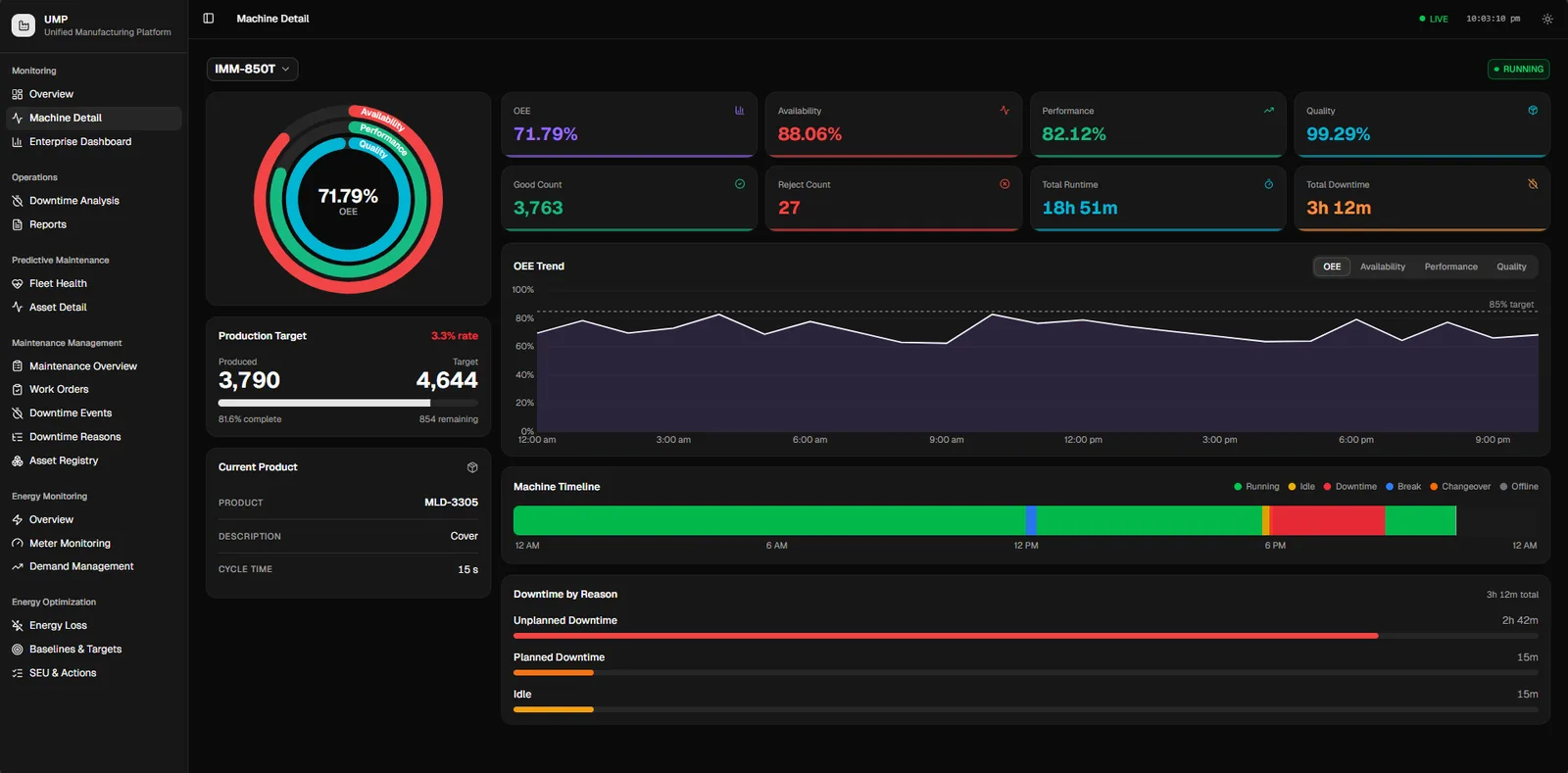
Unified Manufacturing Platform
Production, OEE, downtime, maintenance and energy on one screen, from a single machine up to the whole plant.
Read the case study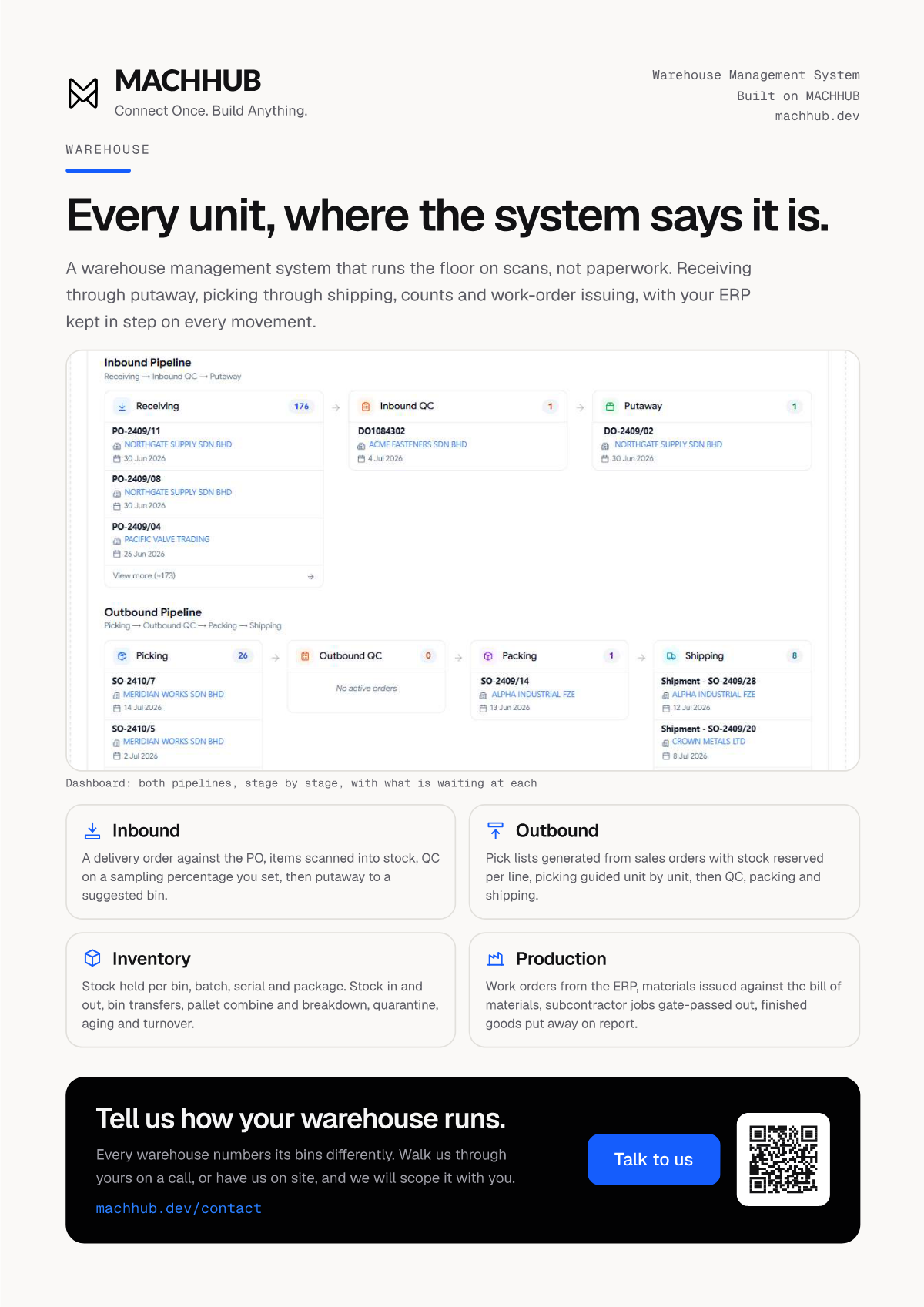
Warehouse Management System
Receiving through shipping run on scans rather than paperwork, with the ERP kept in step on every movement.
Read the case study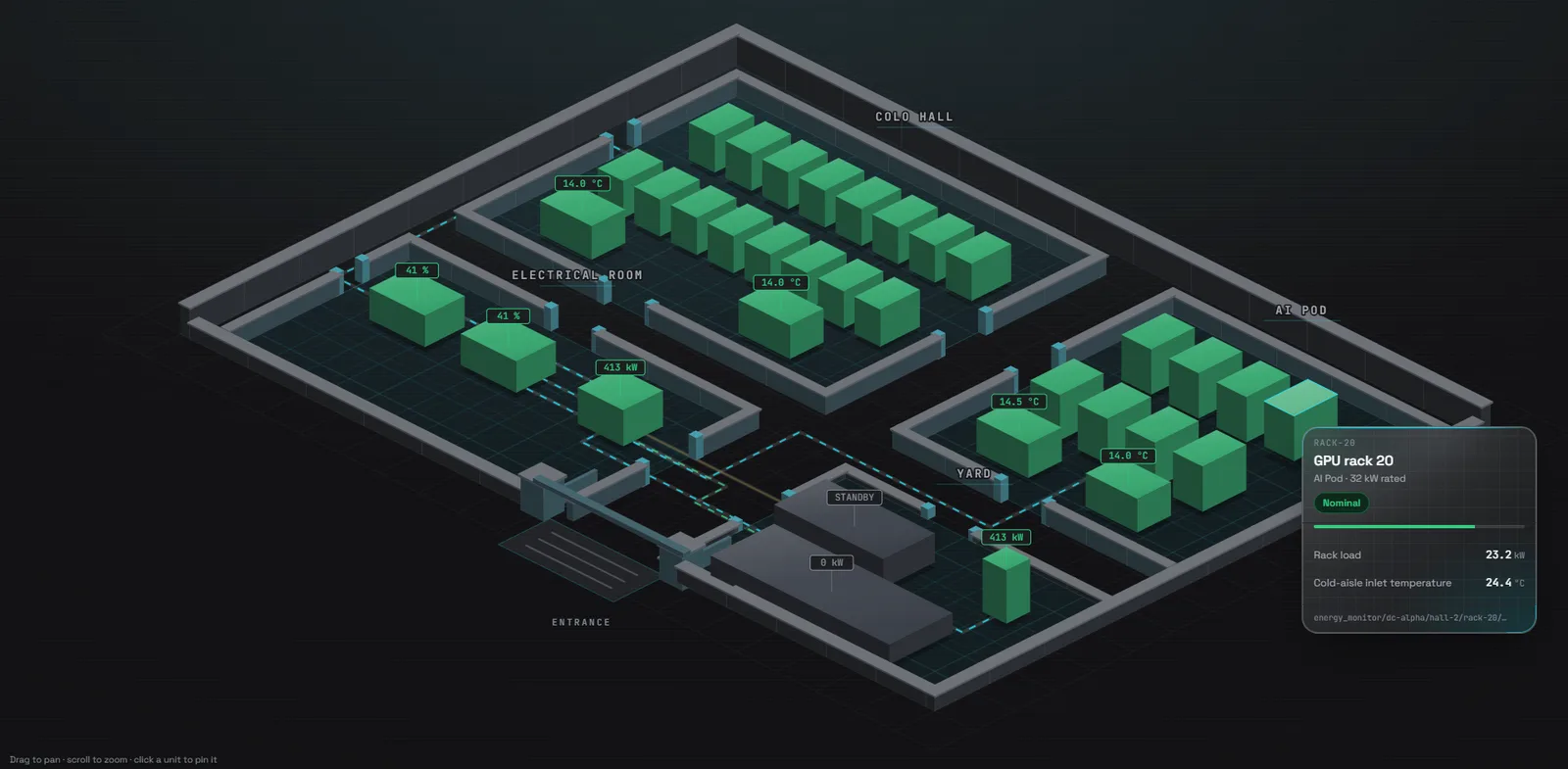
Data Centre Management System
Power, cooling, UPS and PUE from the rack inlet up to the site meter, costed at your own tariff.
Read the case study
Every one of them runs on hardware the customer owns, on a licence bought once. All case studies
Get started
See it on your own machine.
Install it on your own machine and run every module for two hours. No licence key, no account, and nothing to uninstall afterwards.